The Demise of CAPICOM

CAPICOM, a COM-based wrapper for the CryptoAPI library, is deprecated and on its way out. However, Microsoft has no time line for phasing it out, nor have they provided sufficient documentation of alternatives.

Many CAPICOM pages contain a confusing, bright-red header along the lines of:

[The SignedCode object is available for use in the operating systems listed in the Requirements section. Instead, use Platform Invocation Services (PInvoke) to call the Win32 API SignerSignEx, SignerTimeStampEx, and WinVerifyTrust functions to sign content with an Authenticode digital signature. For information about PInvoke, see Platform Invoke Tutorial. The .NET and CryptoAPI via P/Invoke: Part 1 and .NET and CryptoAPI via P/Invoke: Part 2 subsections of Extending .NET Cryptography with CAPICOM and P/Invoke may also be helpful.]

Note that this alarming paragraph seems to begin by simply telling you that this API is supported on the operating systems listed later. It does not state that the API will not be available on later OSes, but why place this here otherwise? The next sentence, beginning with, “Instead, …” seems to be contrasting with something, yet makes absolutely no sense in this context.

Finally, this paragraph instructs us to investigate SignerSignEx, and SignerTimeStampEx, which are supplied by the mssign32.dll, have no header file, and absolutely no example code. This is what I find most irksome, they document each and every function and structure, yet each page says, “there is no header file, so copy and paste the declaration given here.” Well, why not simply provide an mssign.h file on blogs.msdn, or similar? And why, oh why, is there not a single line of sample code?

Follow-up

I have provided a basic header file for mssign32.dll, here.

Posted in Authenticode, COM, Cryptography, Technology, Win32 | Tagged , , | Leave a comment

Unable to Connect to Localhost SQL Server Express Instance

Problem

Connecting programmatically or by using osql failed with the following, generic error:

error: 40 - Could not open a connection to SQL Server

My programmatic attempt looked like this:

string cs = "Data Source=localhost;" +
            "Trusted_Connection=true;" +
            "Initial Catalog=dbname;";
SqlConnection connection = new SqlConnection(cs); 
connection.Open();

Other variants I tried for Data Source were (local), 127.0.0.1, and the fully-qualified name of my local server.

My osql attempt looked like this:

c:\>osql -E -S localhost

Solution

The solution, at least for the basic connection problem, turned out to be a missing instance name. The instance name can be found by looking in Programs | Microsoft SQL Server 2005 | Configuration Tools | SQL Server Configuration Manager, under SQL Server 2005 Services. In my case, the instance is named “SQLEXPRESS“, so I tacked this onto my connection strings for a (more) successful login.

Programmatic:

string cs = "Data Source=localhost\\sqlexpress;" +
            "Trusted_Connection=true;" +
            "Initial Catalog=dbname;";
SqlConnection connection = new SqlConnection(cs);
connection.Open();

osql:

c:\>osql -E -S localhost\sqlexpress
1> 

Authorization

Actually, the above code didn’t quite work. I still get an authorization error:

Cannot open database "dbname" requested by the login. The login failed.
Login failed for user 'DOMAIN\username'.

This was actually because I hadn’t yet created the database, nor a user! I followed this handy guide in order to create a database, a user, and grant the user access to the new database.

In the end, my connection code looks like this:

string cs = "Data Source=localhost\\sqlexpress;" +
            "Trusted_Connection=true" +
            "Initial Catalog=dbname;" +
            "user id=username;password=userpass;";
SqlConnection connection = new SqlConnection(cs);
connection.Open();
Posted in ASP.Net, Technology | Tagged , , , , | Leave a comment

GnuPG Plugin for vim Under Cygwin

GnuPG, GNU Privacy Guard, is a free system for encrypting files, emails, etc. The GnuPG plugin for vim provides automatic encryption and decryption of files within vim. If you attempt to edit a GnuPG-encrypted file with vim, it will prompt you for the password, and re-encrypt the file when you’re done editing.

Download the gnupg plugin for vim from here and copy it into your user directory directory under .vim/plugin. From the Cygwin bash prompt:

mkdir ~/.vim/plugin
copy gnupg.vim ~/.vim/plugin

Run vim, then use the :scriptnames command and verify that gnupg.vim appears in the list of sourced scripts:

  1: /cygdrive/c/Users/username/.vim/plugin/gnupg.vim
Posted in Cryptography, Technology, Win32 | Leave a comment

My Fantastic Contraptions

A collection of solutions for Fantastic Contraption:

My Solutions:

  • Tube – a minimal tube crawler.
  • U-Turn – a floppy, crawling chariot.
  • U-Turn (again)) – a simple cart which uses leverage to apply force on the ceiling.
  • Back and Forth – an awful contraption.
  • Back and Forth – a better version which uses many wheels for low friction, and no bridge.
  • Higher – a ridiculously simple stick-flicker.
  • Around the Bend – a tiny triangle that flops to change direction.

Solutions by Others Which I Like:

My Experiments:

Posted in Fun, Internet | Leave a comment

Neat Flash Games for Nerds

These three games present interesting logic puzzles:

  • Fantastic Contraption – build a machine to get an item into the target zone.
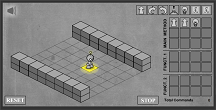
  • Light-bot – provide simple commands to make your robot traverse obstacles (publisher site with annoying, talking banner ads is here).
  • Chronotron – solve puzzles using a time machine.

    Fantastic Contraption

    Light-bot

    Chronotron

Posted in Fun, Internet | Tagged | Leave a comment

A Good Orthopedist in San Francisco

I needed to see someone about my shoulder/neck injury. On the recommendation of a coworker, I went to see Dr. Jon Dickinson. He seems to be very nice, knowledgeable, and happily explains what he’s observing, rather than just writing a prescription.

Contact Information

Dickinson, Jon A, MD
California Pacific Ortho and Sports Med
3838 California St Rm 715
San Francisco, CA 94118
(415) 668-8010

Posted in Injury | Tagged , , , , , , | 1 Comment

Color Test

I just took a fun test to determine how good I am at discriminating colors. Lower values are better. My results:

  • Your score: 8
  • Gender: Male
  • Age range: 30-39
  • Best score for your gender and age range: 0
  • Highest score for your gender and age range: 1464

Neat! Take the test here.

Posted in Internet | Leave a comment

Stripping an Authenticode Signature

We needed to modify the resources of an installer and then apply an Authenticode signature. Unfortunately, it already had a signature on it, and modifying the resources of an executable with a signature results in a corrupted signature. The Microsoft signing tools cannot recover from this situation, so:

It is not possible to re-sign a file after modifying its resources.

However, it is possible to remove the existing signature, modify the binary, and then apply a new signature. There are two approaches (which almost certainly amount to the same thing):

  1. Use delcert.exe from the this XDA Forum post (note, this is not the same as the SMS Server 2003 tool ccmdelcert.exe, which deletes all SMS certificates on a machine).
  2. Write an application which calls ImageRemoveCertificate.
Posted in Authenticode, Technology | Leave a comment

Using Certificates and Signtool

Obtain a Software Publisher Certificate

Your Certificate Authority will supply one of the following:

  1. a Personal Information Exchange (.pfx) file
  2. a Software Publisher Certificate (.spc), and a Private Key (.pvk) file
  3. a CER-encoded X.509 Certificate (.cer), and a Private Key (.pvk) file

For the second and third case, these file must be converted to a Personal Information Exchange (.pfx), using the Pvk2Pfx.exe tool.

Convert SPC or CER to Personal Information Exchange (.pfx)

Syntax for .spc conversion:

pvk2pfx -pvk filename.pvk -pi password -spc filename.spc -pfx output.pfx

The syntax is identical for .cer conversion:

pvk2pfx -pvk filename.pvk -pi password -spc filename.cer -pfx output.pfx

Sign the Executable

Signtool.exe can be used to sign executables (.exe) and Dynamic Link Libraries (.DLL).

Basic Signature

signtool.exe sign /v /f filename.pvk /p password executable

Signature With Timestamp

signtool.exe sign /v /f filename.pvk /p password /t timeurl executable

Where timeurl is the URL of your Certificate Authority’s timestamp server (e.g. http://timestamp.verisign.com/scripts/timestamp.dll for VeriSign)

Signature Verification

signtool verify /pa executable

/pa indicates that the “Default Authenticode” verification policy is used. Omitting the switch will cause the verification to fail, which does not necessarily mean that a given file isn’t Authenticode signed.

Resources

Posted in Cryptography, Technology | 1 Comment

PE Format

While investigating Authenticode, I become curious about the Portable Executable format. This is the file format used by all Windows executables.

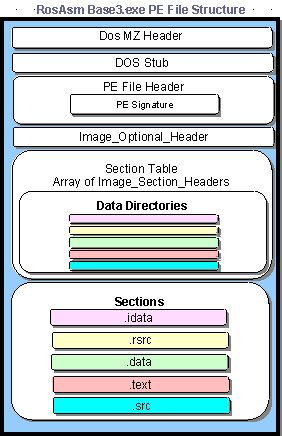
Here is a good overview in the context of .Net. And here is the referenced image which is missing from that post (originally http://jfmasmtuts.blowsearch.ws/Ch2/peheader2.jpg):

Windows PE Header Format

This missing image turns out to be part of a fantastic overview of the PE architecture. While the original article appears to be long gone, it lives on in an archive (and as a PDF in my own archive).

Here is a significantly more dry introduction, from MSDN.

Posted in Technology | Tagged , , , | Leave a comment