I tried the suggestion from this Reddit comment, and it seems to have fixed my problem:
Go to chrome://flags/Then enable Smooth Scrolling, GPU rasterization, Zero-copy rasterizer. And switch Choose ANGLE graphics backend to D3D9.
Go to chrome://flags/Then enable Smooth Scrolling, GPU rasterization, Zero-copy rasterizer. And switch Choose ANGLE graphics backend to D3D9.
Having configured Outlook to download all of my Yahoo Mail messages over IMAP, I noticed that most of my older messages were missing. My Inbox showed 10,000 messages, which is a suspiciously round number. Sending a test email from another account resulted in the message count momentarily dropping to 9,999, then back up to 10,000.
Changing the IMAP server from imap.mail.yahoo.com to export.imap.mail.yahoo.com seems to have resolved the problem. I now have all 15-something thousand messages synchronized.
I like to manually manage my collection of MP3 files on my Android phone. Making folders and copying contents by hand in Windows Explorer is a pain, since I also have FLAC files that I usually don’t want to copy. Here is a batch file I made that uses ADB to copy all of the album folders in the current directory, along with all contained MP3 and JPG files.
Three assumptions are made:
1) Music files are stored on the SD card.
2) Music files are stored using the folder layout of Music/Artist/Album.
3) This batch file is called from the Artist directory on the PC.
@echo off
REM This script copies deploys music files to the connected Android device.
REM All subfolders are created and all .mp3 and .jpg files are copied.

REM Get the SD card folder under /storage.  It will be in the form of 1234-5678:
set SDCARD_FOLDER=
for /f "usebackq delims==" %%i in (`adb shell "ls -d /storage/????-????"`) do set SDCARD_FOLDER=%%i

if "%SDCARD_FOLDER%" == "" goto NoSDCardFolder

REM Get the name of the current folder without any leading path:
for %%i in (.) do set current_folder=%%~ni%%~xi

REM Make sure this artist folder exists on the Android device:
adb shell "mkdir \"%SDCARD_FOLDER%/Music/%current_folder%\""

REM For each subfolder...
for /f "usebackq delims==" %%i in (`dir /b /ad`) do (
    echo "%%i"

    REM Make this subfolder on the Android device:
    adb shell "mkdir \"%SDCARD_FOLDER%/Music/%current_folder%/%%i\""

    REM Enter the subfolder and copy each file to the Android device...
    pushd "%%i"
    for /f "usebackq delims==" %%j in (`dir /b /a-d *.mp3;*.jpg`) do (
        adb push "%%j" "%SDCARD_FOLDER%/Music/%current_folder%/%%i/%%j"
    )
    popd
)

exit /b

:NoSDCardFolder
echo Unable to find SD card folder on Android device.
I was fiddling around with some toy code and needed to find the most significant digit of an integer. I wondered if there was some more clever way to find it, like John Carmack’s fast inverse square root.
Here’s the classic method, using modulus arithmetic in a loop:
int msd(int num)
{
    if (num < 0)
        num *= -1;

    while (num >= 10)
        num /= 10;

    return num;
}
Calling this function a ridiculous number of times yielded an average total runtime of 270,589 microseconds.
Here’s Google’s AI-suggested method:
int getMSD(int num) {
    if (num == 0) {
        return 0;
    }

    int digits = std::log10(std::abs(num)) + 1;
    return num / static_cast(std::pow(10, digits - 1));
}
The same ridiculous number of calls yielded an average total runtime of 2,241,092 microseconds. That’s over eight times slower than the classic, modulus-loop method!
Additionally, Google AI’s static_cast from double to int throws a C4244 warning (possible loss of data). Finally, I believe that Google’s solution is fundamentally incorrect: it returns negative values for negative inputs. By my understanding of “most significant digit”, a digit is defined as the numbers zero through nine, thus any function returning a most significant digit must return a single, unsigned number 0..9.
Software developers regularly complain about Dropbox obliterating their TortoiseCVS/SVN/Git shell icon overlays in Window Explorer. This happens because Windows only supports 15 shell icon overlays. They even play a dirty trick to make sure their icons load first, by inserting spaces before their key names in the Windows Registry. Tortoise engages in the same behavior, battling to be loaded before the 15-item cutoff is reached. You can see the key names with this command:
reg query HKLM\SOFTWARE\Microsoft\Windows\CurrentVersion\Explorer\ShellIconOverlayIdentifiers
The key names look something like this:
ShellIconOverlayIdentifiers\   DropboxExt01
ShellIconOverlayIdentifiers\   DropboxExt02
...
ShellIconOverlayIdentifiers\   DropboxExt10
ShellIconOverlayIdentifiers\  Tortoise1Normal
ShellIconOverlayIdentifiers\  Tortoise2Modified
ShellIconOverlayIdentifiers\  Tortoise3Conflict
...
Personally, I have no use whatsoever for Dropbox’s shell icons, while I depend on those of TortoiseSVN, so let’s delete all the Dropbox entries. This batch file will delete all of the DropboxExtXx keys under ShellIconOverlayIdentifiers, then restart File Explorer so that the changes take effect:
@echo off

for /f "delims=" %%i in ('reg QUERY HKLM\SOFTWARE\Microsoft\Windows\CurrentVersion\Explorer\ShellIconOverlayIdentifiers ^| findstr DropboxExt') do (
   reg DELETE "%%i" /f
)

taskkill /F /IM "explorer.exe"
explorer.exe
NOTE: This script must be run as Administrator in order to work.
On my Windows 11 host, with a Lubuntu guest, bridged networking stopped working one day. The solution was to open Virtual Network Editor on the Windows host (must be run as Administrator) and manually set VMnet0’s “Bridged to:” option to my physical network card:
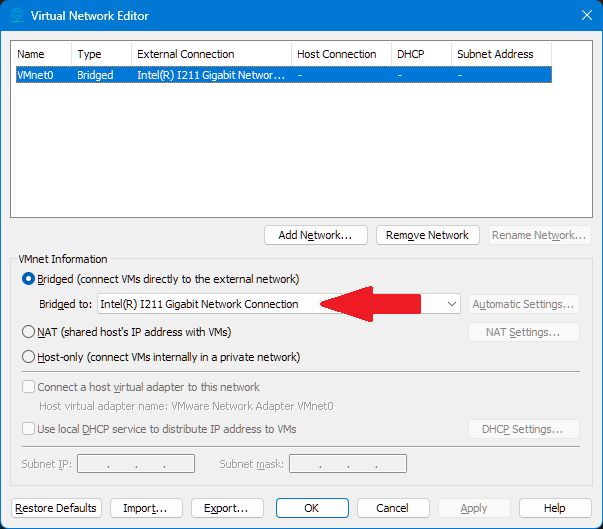
I had already removed the non-bridged virtual network adapters, but that didn’t improve the situation.
It occurs to me that the way we feel about the silly name Duncan Idaho echoes the way that the Fremen felt about the name Muad’Dib (“hopping mouse”) when they first heard it.
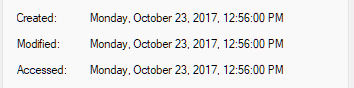
File timestamps can be modified on Windows using PowerShell.
Command Syntax:
(Get-Item YourFilePath).CreationTime = "mm/dd/yyyy hh:mm"
Time can be specified using a 24-hour clock, or using am/pm.
There are three settable timestamps:
Example:
(Get-Item MyFilename).CreationTime = "10/23/2017 12:56pm"
(Get-Item MyFilename).LastWriteTime = "10/23/2017 12:56pm"
(Get-Item MyFilename).LastAccessTime = "10/23/2017 12:56pm"
Results (from the File Explorer file properties dialog):
GaNFast, which appears to be a site intended to promote Gallium Nitride devices, happens to have one of the best charger + hub product lists out there. It gives power, type and number of prts, and overall size, all in one table:
After installing the Visual Studio Theme Pack from the Visual Studio Marketplace website, my installatio of Visual Studio 2022 was completely broken. The error messages I was getting included:
The 'MEF Service Broker Package' package did not load correctly.
The 'Background long idle package' package did not load correctly.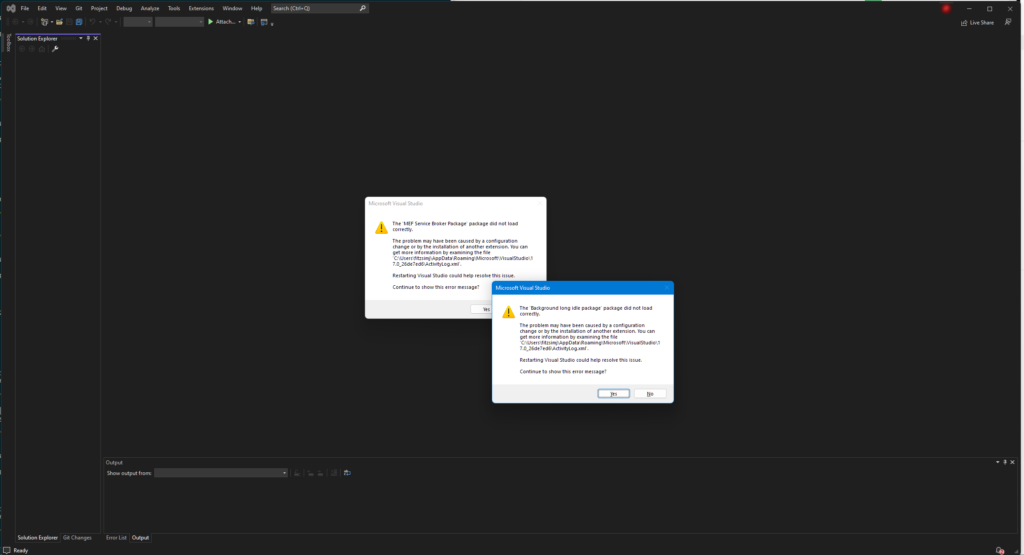
I couldn’t even open Tools | Manage Extensions. In fact, no menu items worked at all, only triggering an error message, "The operation could not be completed." Attempting to open a project resulted in an error "There is no editor available for…"
Even the close button resulted in an error dialog!
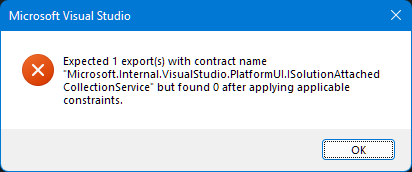
The fix was to uninstall the Visual Studio Theme Pack using this command:
C:\Program Files\Microsoft Visual Studio\2022\Community\Common7\IDE\VSIXInstaller.exe /u:VisualStudioThemePack.453e3fa1-2e0e-467e-abbd-1d08fe6468d1
After some more monkeying around, I managed to get Visual Studio into an even worse condition. Ultimately, running these commands as an Administrator got Visual Studio working again:
C:\Program Files\Microsoft Visual Studio\2022\Community\VC\Auxiliary\Build\vcvars32.bat
devenv /resetuserdata